If you are asking, “why are my flexible solar panels losing efficiency,” the answer is rarely just one problem. Heat, surface dirt, repeated bending, moisture, and aging electrical connections can all reduce energy output. A panel that produced 200 watts on a cool morning may deliver much less on a hot roof or moving vehicle.
Michael Kempe, a photovoltaic reliability researcher at the National Renewable Energy Laboratory, has described the backsheet as “the Achilles’ heel of a PV module.” His observation matters for flexible panels because their backsheets and encapsulation layers often experience more movement than rigid glass modules. Small cracks may appear around mounting points. Water can then reach conductive layers. The damage may remain invisible.
Check the basics first. Compare today’s output with the original rating under similar sunlight. Clean dust, leaves, and bird residue gently. Avoid sharp tools and aggressive solvents. Inspect cable glands, connectors, and areas pressed against metal surfaces. A digital multimeter can reveal unusual voltage loss, but electrical testing should be performed safely by a qualified technician.
Not every low reading proves permanent failure. Shade from a roof vent can look like degradation. An undersized charge controller can also limit harvest. I have seen troubleshooting guides focus too quickly on replacement, which is not always justified. Keep a dated record of temperature, sunlight, and output for several days. Patterns usually tell a clearer story than one disappointing reading. Flexible technology is useful, but it is not maintenance-free.
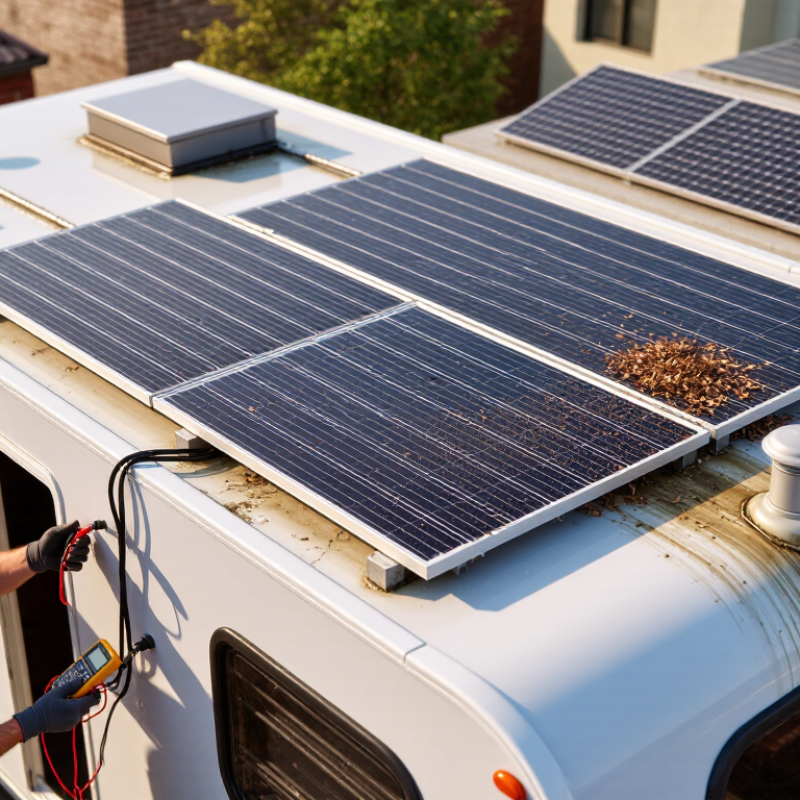
Efficiency loss means the panel produces less power than it produced under comparable conditions. Do not compare today’s output with the printed wattage alone. Measure voltage and current at similar sunlight levels, panel temperature, tilt, and battery conditions. A cool, clean panel in direct midday sun provides a more useful reference.
The National Renewable Energy Laboratory commonly uses about 0.5% annual degradation as a practical photovoltaic benchmark. After five years, a healthy panel might produce roughly 97.5% of its original output, assuming other conditions remain similar. This is a slow decline, not a sudden 20% drop. Flexible panels can also lose usable output from heat, repeated bending, surface dirt, partial shade, loose connectors, or damaged wiring.
In field checks, I would record readings over several clear days. Short tests can mislead. Compare the average output with your original baseline, then calculate the percentage difference. For example, a 100-watt panel producing 82 watts under matching conditions shows an 18% loss. That result needs investigation before blaming normal degradation. I would inspect mounting pressure and cable joints first. My own measurement habits are not perfect, and temperature corrections are easy to overlook. The 0.5% benchmark is a reference point, not a guarantee for every flexible design.
Flexible solar panels can lose output even when the sky is clear. Heat is often the quiet cause. Silicon cells commonly lose about 0.3% of rated power for every 1°C rise above the reference temperature, usually 25°C. A panel reaching 65°C may therefore surrender roughly 12% of its power. That estimate is not perfect, because construction, airflow, and measurement conditions vary. Still, it is a useful warning.
Do not compare cell temperature with the weather app. I use an infrared thermometer on the panel’s rear surface, checking the center and edges. The rear may reach 55°C while air temperature is only 32°C. A voltage reading can also reveal heat: warm silicon produces lower operating voltage. My first diagnosis was too optimistic. I blamed the charge controller before checking temperature.
Flexible panels often sit close to a roof, leaving little air beneath them. A small ventilated gap can reduce heat buildup when installation allows it. Keep wiring secure, remove dirt, and inspect dark objects trapping heat on the surface. Do not cool a hot panel suddenly with water. Thermal stress may damage its layers. If output remains low after cooling, test shading, connectors, and battery demand separately. Temperature is common, not universal.
Flexible solar panels can lose output after repeated bending, even when their surfaces look clean. The damage often begins inside the laminate, where tiny cracks interrupt electrical pathways. Inspect bending stress before blaming sunlight, wiring, or the charge controller.
During installation, check every sharp corner, tight fold, and unsupported edge. A panel should follow a broad curve, not a crease. Pressing it around a narrow frame can strain cells beneath the protective coating. Look for hairline marks, pale lines, bubbles, or areas that feel unusually soft. Use gentle light at a low angle; small cracks can disappear under direct glare. Do not bend the panel to test it. That can worsen hidden damage.
After repeated flexing, compare its voltage and current with earlier readings under similar sunlight. Lower current often suggests cracked cell connections, while unstable voltage may indicate intermittent contact. Thermal images can reveal warmer sections, but they need careful interpretation. I once trusted a normal open-circuit voltage too quickly; the panel still produced weak current under load. That was a useful correction. Record mounting photos and measurements after each inspection. If the backing is split or conductors are exposed, stop flexing the panel and seek a qualified solar technician. Surface appearance alone is not reliable evidence.
Flexible solar panels can lose efficiency through moisture, heat, ultraviolet exposure, or repeated bending. The damage often begins invisibly. Output drops before bubbles, cracks, or discoloration appear.
IEC 61215 uses a damp-heat test at 85°C and 85% relative humidity for 1,000 hours. This controlled chamber test stresses encapsulants, seals, interconnections, and protective layers. Technicians compare electrical performance before and after exposure. They also inspect insulation, delamination, corrosion, and visible defects. However, passing this test does not guarantee decades of outdoor performance. It demonstrates qualification under a defined condition.
UV damage requires separate attention. Sunlight can embrittle polymer surfaces, fade protective coatings, and create tiny cracks around mounting points. Moisture may then enter those cracks.
Measure the panel’s open-circuit voltage, operating current, and power under consistent sunlight. Record temperature and shading carefully. A cheap meter can mislead you.
Look closely at corners and cable exits. These areas often collect water. Do not bend a warm panel sharply during inspection. One imperfect assumption is blaming every power loss on UV exposure. Dust, wiring resistance, partial shading, and a failing controller can produce similar symptoms. Repeat the test. Compare results over time, and question measurements that do not match the physical evidence.
Flexible solar panels can lose output for different reasons, and the symptoms often look identical. Start with wiring. Measure voltage at the panel, controller input, and battery terminals under sunlight. A noticeable drop between those points suggests resistance from thin cables, loose terminals, or oxidized connectors. The National Renewable Energy Laboratory’s PV degradation report found a median module degradation rate near 0.5% per year, but poor connections can create immediate losses far larger than normal aging.
Shading needs separate testing. A vent, roof rail, or folded edge can reduce current across a large section of the panel. Record current with the panel fully exposed, then repeat while covering only one cell area. Do this carefully. A digital clamp meter helps, although inexpensive meters can mislead. The Fraunhofer Institute’s Photovoltaics Report 2024 places modern commercial module efficiency around 20–23%, leaving little energy to waste through avoidable resistance.
The controller also deserves attention. Confirm that it uses genuine maximum power point tracking, not simple voltage regulation. Check its input voltage range, rated current, temperature, and charging stage. Conversion efficiency commonly falls by several percentage points under high current, long cables, or poor ventilation. IEA PVPS Task 13 reports that system-level losses depend heavily on installation conditions, not only module ratings. I once blamed the panel before finding a warm connector under the deck. It was a humbling mistake. Compare panel-side and battery-side power at the same moment, and inspect every connection before replacing equipment.
Use the comparison below to distinguish environmental losses from electrical losses before replacing a flexible solar panel. The percentage ranges are practical diagnostic estimates and vary with panel temperature, system voltage, cable length, and operating conditions.
| Possible Cause | Typical Operating Sign | Expected Power Loss | Recommended Verification | Likely Measurement | Corrective Action |
|---|---|---|---|---|---|
| Partial shading | Output changes sharply when a vent, rail, branch, or nearby object moves across the panel. | 5–50% or more | Compare current with the same panel fully exposed to sunlight. Inspect shade at different times of day. | Voltage may remain fairly normal while operating current drops. | Relocate the panel, remove obstructions, or use separate inputs for differently shaded panels. |
| High-resistance connector or crimp | Power falls as current rises; a connector or terminal may feel unusually warm. | 2–15% | Inspect, isolate, and measure voltage on both sides of each connector while the panel is producing power. | Noticeable voltage drop across one connection, often increasing under load. | Replace damaged connectors, remake crimps correctly, and keep connections dry and strain-relieved. |
| Undersized or excessively long cable | Controller input voltage is substantially lower than panel voltage, especially during high-current operation. | 1–10% | Measure voltage at the panel and at the controller simultaneously, then compare the difference. | Greater voltage loss with longer cable runs and higher current. | Shorten the cable or use a larger conductor size suitable for the system current. |
| Incorrect series or parallel wiring | Array voltage or current does not match the expected configuration. | 10–100% | Check polarity, open-circuit voltage, short-circuit current procedure, and the number of panels in each branch. | Unexpected voltage, very low current, or one branch contributing little power. | Correct polarity and wiring layout; use matching panels and properly rated fuses where required. |
| Poor MPPT operating point | Panel voltage remains near open-circuit voltage, or the controller output is low despite strong sunlight. | 5–30% | Record panel-side voltage and current while charging, then compare with the panel’s rated maximum-power voltage. | Operating voltage is far from the panel’s normal maximum-power region. | Confirm controller compatibility, adequate input voltage, correct settings, and sufficient solar input. |
| Controller current or voltage limit | Output stops increasing even when solar input continues to improve. | 5–25% | Compare the array’s available power with the controller’s rated PV voltage, current, and output limits. | Stable output ceiling near the controller’s maximum rating. | Use a controller with suitable ratings or reduce array size to remain within specifications. |
| Panel overheating | Power is lower around midday and improves later when the panel cools. | 5–20% | Compare panel temperature and output with morning or late-afternoon readings under similar sunlight. | Voltage decreases as cell temperature increases; current changes less significantly. | Improve airflow where installation allows and avoid mounting methods that trap excessive heat. |
| Surface dirt, salt, or residue | Output gradually declines and improves after safe cleaning. | 2–15% | Inspect the surface under direct light and compare output before and after cleaning. | Both current and power are lower without a major wiring voltage drop. | Clean with water and a soft, non-abrasive material according to the panel’s care instructions. |
| Battery nearly full or charging restriction | Panel-side production is available, but regulated battery current becomes very low. | Not a panel loss | Check battery state of charge, charge stage, controller status, and panel-side input power separately. | Panel voltage may be normal while battery charging current is intentionally limited. | Evaluate the system over a complete charge cycle rather than judging performance at full battery. |
| Flexible panel bending, delamination, or cell damage | Output remains low in strong sunlight and does not recover after wiring and shading checks. | 10–80% | Inspect for cracks, bubbles, discoloration, creases, water ingress, and abnormal diode behavior. | Reduced current, unstable output, or one section showing a significant mismatch. | Stop using visibly damaged equipment and obtain a qualified electrical inspection or replace the panel. |
Heat may be the quiet cause. Silicon output commonly falls about 0.3% for each degree above 25°C. At 65°C, output may drop roughly 12%.
Do not rely on the weather app. Measure the rear surface with an infrared thermometer. Check the center and edges. Air temperature can be 32°C while the panel reaches 55°C.
Often, yes. A small ventilated gap can reduce heat buildup. Panels mounted tightly against roofs usually retain more heat. Installation limits still matter.
Repeated flexing can create tiny cracks inside the laminate. These cracks interrupt electrical pathways. Current may fall, even when the surface looks clean.
Inspect sharp corners, tight folds, and unsupported edges. Look for hairline marks, pale lines, bubbles, or unusually soft areas. Use gentle, low-angle light. Do not bend the panel for testing.
Measure voltage at the panel, controller input, and battery terminals. A noticeable difference suggests resistance. Thin cables, loose terminals, and oxidized connectors can waste power immediately.
Record current with the panel fully exposed. Then cover only one cell area and repeat the measurement. A vent, rail, or folded edge may reduce current across a large section.
Yes. Confirm maximum power point tracking, input limits, current capacity, charging stage, and ventilation. Compare panel-side power with battery-side power at the same moment. I once blamed the panel too quickly. A warm connector was the real problem.
If you are asking, “why are my flexible solar panels losing efficiency,” begin by comparing their current power output with their original rating and the typical photovoltaic degradation benchmark of about 0.5% per year. A larger decline may indicate heat, mechanical stress, moisture, ultraviolet exposure, or an electrical problem. High temperatures can reduce silicon performance by approximately 0.3% for every 1°C increase, so poor ventilation or installation on a hot surface may significantly lower production.
Repeated bending can create hidden cracks or damage in the cells and conductive layers, especially around mounting points. Inspect the panel carefully for creases, delamination, or visible fractures. Moisture and UV damage should also be considered, using durability expectations such as exposure to 85°C and 85% relative humidity for 1,000 hours. Finally, check wiring, connectors, shading, resistance, and the charge controller separately. An improperly configured maximum power point tracker can cause losses even when the panel itself is healthy.
